03 · Your team

The whole office,
on one screen.

One dashboard for cases, hearings, tasks and performance: filter by lawyer, branch or period, and open any number to see the records behind it.

“An integrated view” · Tibyan film 03 Narrated in Arabic · under a minute
The film’s script

Managing legal work does not stop at assigning cases… it starts with being able to follow every detail of them.

Where have the cases got to? Which tasks are overdue? And how is the work progressing across your legal team?

With Tibyan, the picture is clearer.

One management dashboard gives you a full view of cases, hearings, tasks and performance indicators.

Follow the work by lawyer, branch or period, review the details, and see what needs following up.

Organised information, clear responsibilities, and indicators that help you decide at the right time.

The film is narrated in Arabic; this is its script in English.

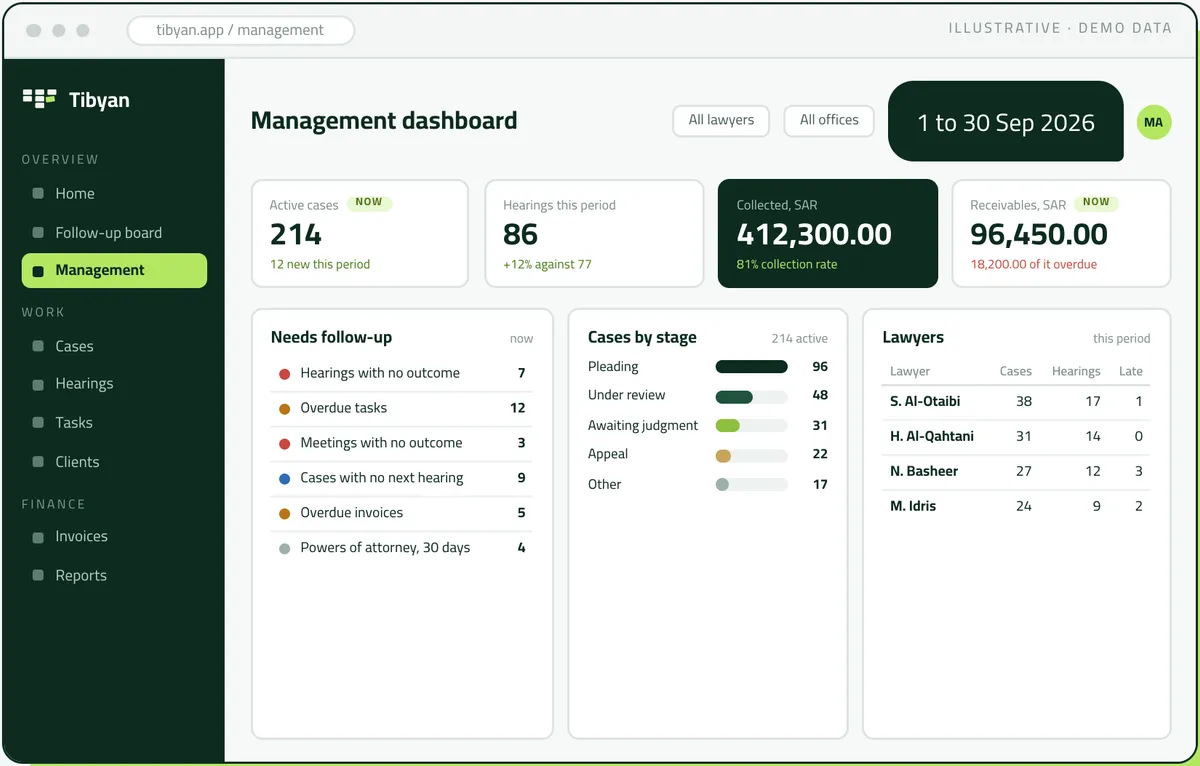
The Tibyan management dashboard for September 2026: active cases, hearings, collections, receivables and the follow-up list (demo data)
Illustrative · demo data
For the managing partner

Where things stand now, and what changed.

Filtered by lawyer, office and period: where things stand now, what changed since the last period, and what needs following up.

01 · Now and the period

Two kinds of figure

Figures that describe the current state carry a Now badge; period figures are compared with the period before.

02 · Needs follow-up

The list beside the figures

The follow-up list sits beside the figures, and every number on it opens the records behind it.

03 · By lawyer

Each lawyer’s caseload

Cases by stage, and each lawyer’s cases, hearings and late items. The whole dashboard filters to one lawyer.

04 · Permissions

Amounts by permission

Amounts appear only to those allowed to see them. A colleague without that permission sees the work, not the money.

Follow-up

Six things every office forgets, and won’t any more.

Nobody needs to keep a list of what is late. Tibyan reads it straight from the records, so the managing partner and the legal assistant see the same list.

Hearings 7 No outcome

Held, and nobody wrote down what was decided.

Tasks 12 Overdue

Past their date and not yet done.

Meetings 3 No outcome

The meeting happened and nothing was recorded.

Cases 9 No next hearing

An active case with no next hearing in the calendar.

Invoices 5 Overdue

Issued, unpaid and past their due date.

Powers of attorney 4 Lapsing soon

Lapsing within the next 30 days.

Late appears by itself

No status to forget

Being late is not a status someone sets by hand and then forgets. It appears when the date passes with nothing recorded.

Every number opens its list

From the count to the records

The counts above are this office’s dashboard. One click on any of them opens the records behind it, with the lawyer on each.

A day in practice · The managing partner Illustrative · demo data

The month on one screen

At the start of October, the managing partner opens the management dashboard for 1 to 30 September, across all lawyers and all offices. 214 active cases, 12 of them new. 86 hearings, up 12% on the 77 of the period before. SAR 412,300.00 collected, an 81% collection rate. SAR 96,450.00 receivable now, SAR 18,200.00 of it overdue.

The panel that matters is Needs follow-up. Nine active cases have no next hearing in the calendar, and one click on that number opens the nine cases themselves, with the lawyer on each.

The lawyers table shows N. Basheer with 27 cases, 12 hearings this period and 3 overdue items. Filtering the whole dashboard to that one lawyer shows exactly which items they are, and a follow-up task goes to the associate on each case that needs its date confirmed.

The weekly meeting gets shorter. Nobody recalls hearings from memory, because the list comes from the records, and the legal assistant is working from the same list. A colleague without financial permission opens the same dashboard and sees the work, but not the amounts.


Questions

Frequently asked questions

Can the dashboard be filtered to one lawyer?

Yes. The whole dashboard filters by lawyer, office or period, and shows each lawyer’s cases, hearings and late items.

How does Tibyan know what is late?

It reads it straight from the records: hearings held with no outcome, tasks past their date, meetings with nothing recorded, active cases with no next hearing, overdue invoices, and powers of attorney lapsing within 30 days. Nobody sets a late status by hand.

Does everyone see the amounts on the dashboard?

No. Amounts appear only to those with permission to see them; a colleague without it sees the work, not the money.

Does the dashboard work across branches?

Yes. It filters by office, or shows all offices together.

Two Saudi professionals shaking hands
Your first week

You argue the case.
Tibyan follows it up.

Start with one office, then every branch. Send us a list of your open cases and a week of your calendar. We will set Tibyan up with your team and show you that week as they would have lived it.

  1. 01 You send

    A list of your open cases and one week of your calendar.

  2. 02 We set up

    Tibyan with your team, your letterhead and your templates, in Arabic.

  3. 03 You see

    That week as your team would have lived it in Tibyan.

hala@tebyan.sa +966 11 411 0394 Riyadh, Saudi Arabia